What a running plan generator needs to know
Five inputs separate a plan built for you from a generic template with your name on it. If a generator doesn't ask for these, it isn't really generating anything:
- Goal distance — 5K to ultra. Distance decides the whole shape of training: a 5K plan is built around speed and short intervals, a marathon plan around long-run progression and fueling. There is no plan that works for both.
- Race date — the plan is built backwards from it. The taper has to end on race day, the peak weeks have to sit just before the taper, and the buildup has to fit in whatever weeks remain. Change the date and everything upstream shifts.
- Current fitness — a recent race time or your actual run history, not a self-rated "intermediate." Fitness sets every pace in the plan; guess it wrong and every workout is either too easy to build anything or too hard to recover from.
- Days per week you can run — a 6-day plan compressed into 4 days doesn't work; the sessions have to be redistributed, not just deleted. Honest availability changes the structure, not just the volume.
- Experience level — years of running and past race distances determine how aggressively volume can ramp and whether the plan should include harder session types like intervals at all.
The third input is where most free generators quietly fail. "Beginner / intermediate / advanced" dropdowns produce paces that are wrong for almost everyone, because self-assessment and measured fitness rarely match. A generator that reads a real race result — or better, your actual runs — starts from the truth.
The problem with one-shot generators
Most running plan generators hand you a PDF or spreadsheet and consider the job done. But a generated plan is a snapshot: it captures your fitness and calendar on the day you filled in the form, and it starts going stale immediately. It can't handle a missed week, a cold, a work trip, faster-than-expected progress, or a race that gets rescheduled. The first time real life happens, the plan and reality diverge — and the plan has no way to notice.
That leaves you doing the coaching yourself: deciding whether to cram the missed sessions, skip ahead, or repeat a week. Static generator output has exactly the same failure mode as a plan out of a book — it just took less typing to get.
Generator vs adaptive plan
The useful reframe: generation should be the start of a loop, not the end of one. The loop looks like this — generate a plan, train, compare what you actually ran against what was planned, then regenerate the next week with that evidence baked in. Repeat until race day.
Run that loop by hand and it's what a human coach does every Sunday night. Run it automatically and it's what an AI coach is for. Either way, the one-off generation step you were searching for is the cheapest part of the process — the value is in the loop that follows it.
How The Running Genie generates your plan
The Running Genie is an app for iOS and Android, not a web form — because the loop above needs a live feed of your runs. You connect your running data (Strava, Garmin, Polar, Suunto, or Apple Health), so current fitness is measured from what you've actually run instead of self-rated. Then you set your goal race, its date, and an optional target time, and answer a few schedule questions: how many days per week you can run and how experienced you are.
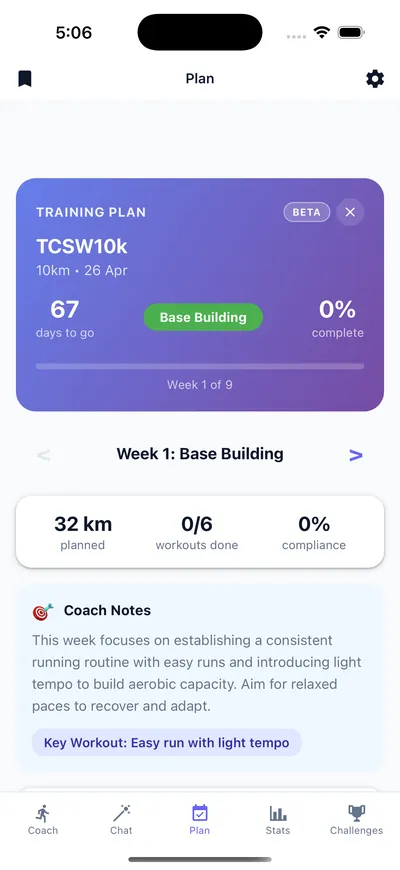
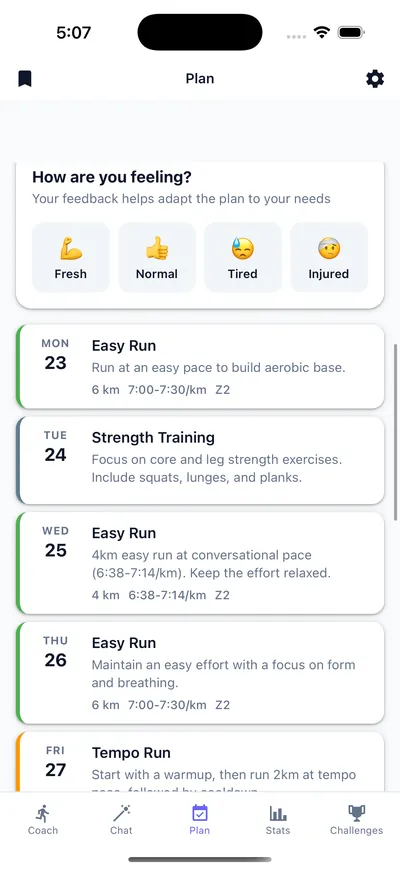
From those inputs the plan generates in about two minutes: the weekly structure, a long-run progression, a periodized buildup with a taper timed to race day, and workout paces calculated from your Daniels VDOT score. Then the part a PDF can't do — every week the app compares what you ran against what was planned and regenerates the week ahead, so the plan you follow in week 9 reflects the training you actually did in weeks 1 through 8.
Download the app and connect your runs
Sign in with Strava, Garmin, Polar, Suunto, or Apple Health. Your run history syncs automatically and becomes the fitness input — no self-rating.
Set your goal race and date
Pick the distance — 5K, 10K, half marathon, marathon, or ultra — add the date, and set a target time if you have one. The plan is built backwards from race day.
Answer the schedule questions
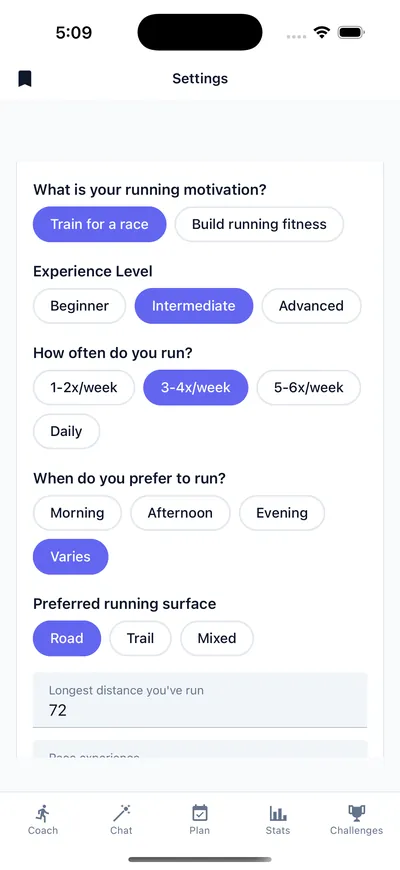
Days per week you can run, your experience level, and what drives you. These shape the structure of the plan, not just its volume.
Generate the plan
In about two minutes you get the full plan: weekly structure, long-run progression, periodized phases and taper, and paces from your Daniels VDOT score.
Train — and let it regenerate weekly
Each week the app compares actual training against the plan and rebuilds the week ahead. Miss a week, get faster, or feel run down — the plan responds instead of expiring.
What the generated plan looks like
Free generators worth using
Not everything needs an app. These tools run free in your browser and generate the numbers a plan is built from:
- Race time predictor — predict your finish time for any distance from a recent race result.
- Running pace calculator — the pace / time / distance math for planning any single run.
- All calculators — the full set of free tools.
The honest split: the calculators generate paces and predictions, free, forever. The app generates the full plan those paces belong to — and keeps it current week after week.
Free and Pro, honestly
The Running Genie is free to download on iOS and Android. The free tier includes AI coach conversations, run syncing, and a free preview of your generated plan. Full plan access — the complete week-by-week schedule with ongoing weekly adaptation — is part of the Pro subscription ($7.99/month or $49.99/year). What's free and what's Pro is clear before you start.
Running plan generator FAQ
Is there a free running plan generator?
Partly. The free calculators on this site — the race time predictor, VDOT calculator, and pace calculator — generate training paces and race predictions in your browser at no cost. The Running Genie app is free to download and shows a free preview of your generated plan; the full week-by-week plan with ongoing adaptation is part of the Pro subscription.
Can it generate a marathon plan?
Yes. The Running Genie generates plans for 5K, 10K, half marathon, marathon, and ultra distances. Every plan is built backwards from your race date, so the buildup, peak weeks, and taper land exactly where they should on your calendar.
How does it choose my training paces?
From your real runs. The app calculates a Daniels VDOT score from your synced running data and converts it into personal easy, tempo, interval, and race paces. You never self-rate your fitness — the paces come from what you have actually run.
What if my race date changes?
Update the race in the app and the plan rebuilds around the new date. Because the plan is generated backwards from race day, a new date means a recalculated buildup and taper — not a plan you have to stretch or squeeze by hand.
How is this different from a ChatGPT-generated plan?
A plan from an LLM chat is static text: it can look sensible, but it has no feed of your actual runs, so it cannot check whether you did the training or adjust when life intervenes. An adaptive app measures every run you sync, compares it against the plan, and updates the coming week — the generation step repeats instead of happening once.
Generate your plan today
Download The Running Genie free, connect your runs, and generate a plan built backwards from your race date and measured from your real fitness — in about two minutes.


Free download · Works with Strava, Garmin, Polar, Suunto & Apple Health